
Who is controlling my Mac
While it is being controlled you can always see it, and only the person at the machine can dismiss it.
Will I know when my Mac is being controlled while I'm sitting at it?
Always. While being controlled, a red banner stays at the top of the Mac's screen reading "(device name) is controlling this Mac", visible on every desktop and over full-screen apps. Only you at the computer can press its "Disconnect" button — remote clicks can't reach it, and the banner never appears in the stream at all. In addition, the connection history records who connected, when each session started, and how long it lasted.
How do I revoke a device's access?
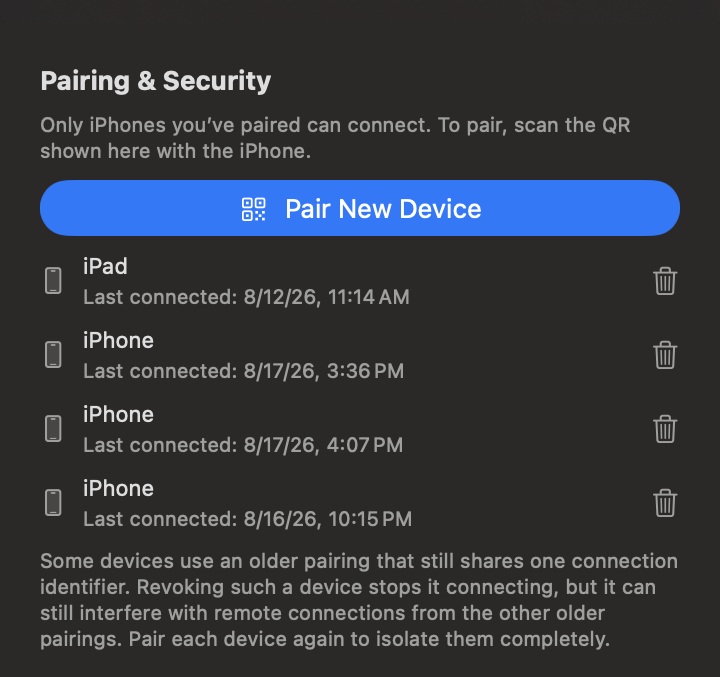
In the shared Mac's "Pairing & Security" list, select the device and revoke it; if it is currently connected, it is disconnected immediately. That device must pair again before it can reconnect. The "Connection History" next to it also shows when each device connected and for how long.
After you tap Disconnect
Remote control ends, and for the next minute new connections are refused so the other device cannot come straight back. After that minute it behaves normally again. If you don’t want it back at all, revoke that device’s pairing while you are there.
A note on older pairings
Some devices use an older pairing that still shares one connection identifier. Revoking such a device stops it connecting, but it can still interfere with remote connections from the other older pairings. Pair each device again to isolate them completely.