
COMPARE
Compare Mac remote desktop apps.
TouchNow lets you control a Mac from an iPhone or iPad for free on the same Wi-Fi. Connecting from outside that network requires a Remote Access subscription. Use the table below to compare supported computers, connection options and billing across apps.
Choose another product
TouchNow | ||
|---|---|---|
 TouchNowYour own Mac, on your iPhone or iPad. Free on the same Wi-Fi Remote: US$2.99/month or US$19.99/year Download TouchNowSources and comparison notes 1 | Duet DisplaySecond displays and remote desktops across platforms. Subscription plans Choose a plan by features and connection type; see official pricing Official site Sources and comparison notes 2 | Jump DesktopReach different computers from your mobile device. One-time purchase iPhone / iPad app; regional App Store pricing Official site Sources and comparison notes 3 |
Start with your devices. | ||
| iPhone app | ||
| Supported1 | Supported2 | Supported3 |
| iPad app | ||
| Supported1 | Supported2 | Supported3 |
| Computers you can connect to | ||
| Mac1 | Mac, Windows2 | Mac, Windows, Linux3 |
At home. Or away. | ||
| Access over the Internet | ||
| Remote Access subscription required1 | Requires an eligible paid plan2 | Connect over the Internet3 |
| Connection method | ||
| Same local network1 | USB or Wi-Fi2 | Same local network3 |
| Dedicated hardware | ||
| No dedicated adapter1 | No dedicated adapter2 | No dedicated adapter3 |
Compare the experience. | ||
| Extra and virtual displays | ||
| Creates an extra desktop1 | Creates an extra desktop2 | One device-sized virtual display; Connect 10+3 |
| iPhone / iPad controls | ||
| Trackpad, direct touch and keyboard1 | Touch controls and gestures2 | Trackpad, direct touch and keyboard3 |
| Free use and purchase model | ||
| All features free on the same Wi-Fi, no time limit1 | See official plan and trial terms2 | iPhone / iPad app is a one-time purchase3 |
The selected products share the same listed capabilities here. Turn off “Show differences only” to see all rows.
TouchNow vs. Jump Desktop for controlling a Mac from an iPad
TouchNow and Jump Desktop both let you control a Mac from an iPad. The main differences are which computers you can connect to, what you pay for, and how you interact with the desktop.
- TouchNow: Install the free TouchNow Host on your Mac and pair it with the iPad app. Control your Mac for free on the same Wi-Fi. A Remote Access subscription is required to connect across networks. On iPad, you can switch between a trackpad and direct touch, or stream and control a single Mac window.
- Jump Desktop: The iPad app is a paid download. Jump Desktop Connect supports remote access to both Mac and Windows computers. The iPad app supports touch gestures and external keyboards and mice.
Set up TouchNow · How to stream and control one Mac window on an iPad · Set up Jump Desktop · Jump Desktop on the App Store
Using TouchNow to control a Mac from an iPhone or iPad
Can I control a Mac mini or iMac for free on the same Wi-Fi?
Yes. TouchNow lets your iPhone or iPad view and control a Mac on the same Wi-Fi for free, without an account or a time limit. You can use the Mac apps that are already installed, including from another room.
What do I install on each device?
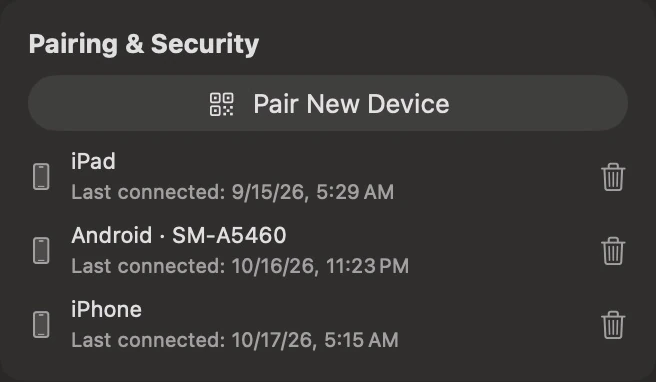
Install TouchNow Host on the Mac you want to control. It’s a free download from touchmac.app for Apple silicon and Intel Macs running macOS 13 or later. Install TouchNow Remote from the App Store on your iPhone or iPad. Open the Host, choose Pair New Device, and scan the QR code in the mobile app. See the pairing steps.
What if I want to connect while I’m away?
To control your Mac across networks, such as from mobile data or a different Wi-Fi network, you need a Remote Access subscription. The US list price is $2.99 per month or $19.99 per year. See the Remote Access plans.
Sources and comparison notes
Official information checked: October 17, 2026
Prepared by TouchNow from official public information for personal use. This is not a performance test under identical conditions. An undocumented feature does not mean it is unsupported. Features depend on version, hardware and plan.
USD prices are published list prices. Region, taxes and App Store pricing may differ; check the price at checkout. Product names belong to their owners and identify the products only; no affiliation or endorsement is implied.
- TouchNow — Official site · Pricing details · Feature documentation
- Duet Display — Official site
- Jump Desktop — Official site · Feature documentation
- Screens 5 — Official site · Pricing details
- Apple Sidecar — Official site
- Luna Display — Official site
- OpenDisplay — Official site
- Astropad Workbench — Official site · Pricing details
- Parsec — Official site · Feature documentation